

The Issues

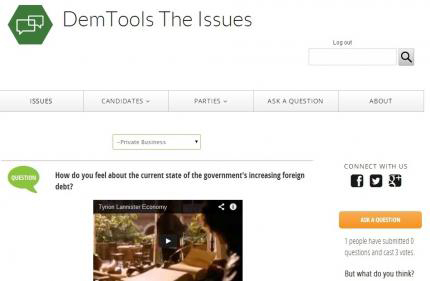
LEARN WHERE CANDIDATES STAND with the NDItech Issues webapp, which presents candidates’ positions on key issues via recorded YouTube videos and allows citizens to ask them questions directly. Politicians’ video messages hone media presentation and communication skills. Citizens can “vote” with a thumbs up or down or engage in dialogue with comments. The candidates’ statements can also be shared via social media, enabling civic groups to connect voters directly to their political leaders and open new avenues of communication.
You can login to the Issues demo below with username Demo and the password Demo.
How to Get the Tool:
Thanks to cloud-based hosting of DemTools, we are able to instantaneously spin up a new versions of the Issues. However, this service is currently only available to NDI partner organizations. If you are a partner organization and would like your own copy of the Issues, please contact NDItech at [email protected]. If you are not a partner organization, these tools are open source and relatively easy to download and install. You can get the tool by following the installation instructions below.
Installation Instructions
To install The Issues DemTool, you'll need a Linux server, comfort working with LAMP web stacks, some systems administration experience, and time to play around. This tool utilizes a Drupal based content managmenet system.
Simply download the repository from https://github.com/nditech/the-issues into a web root:
git clone https://github.com/nditech/the-issues.git
Then run the installer at http://yourwebsite.com and select the town_hall profile.
- 1756 reads
Learn More About DemTools
By joining our open source community, you'll receive updates about the tools and information about how to stay involved.
* Required
Accountability
Advertising
Approaches
Apps
Assessment
Campaigns
Civil Society
Closed Societies
Communication Strategies
Community
Conversation
Crowdsourcing
Digital Security
Distance Learning
Election Monitoring
Fail
Finance and Budget
Human Rights
Internet Freedom
Legislative
Liveblog
Low Tech
Messaging
Meta
Mobiles
Open Data
Organizational Development
People Tracking
Political Parties
Radio
Roundup
SMS
Social Media
Sustainability
Transparency
TV
Visualization
Win
Women
Youth
NDITech on Twitter

